


If you are a .NET developer looking to build modern desktop applications, you have likely stumbled across the term ChromiumFX. It is a tool that promises to bridge the gap between old-school desktop software and the shiny, responsive world of the web. But in a landscape filled with rapidly changing technology, understanding what this framework actually does is crucial.
You might be wondering if it is still the right choice for your next project. Or perhaps you are maintaining legacy code and need to understand what is happening under the hood. This guide breaks down everything you need to know about it, from its core architecture to its modern-day relevance. We will skip the jargon and get straight to the facts that matter to your development workflow.
What is ChromiumFX and Why Should You Care?
At its simplest level, it is a framework that allows developers to embed the Chromium web browser engine into .NET applications. Think of it as putting a Google Chrome tab directly inside a Windows desktop app. This allows you to build user interfaces using HTML, CSS, and JavaScript, while the backend logic runs on C# or VB.NET.
For years, developers struggled with the limitations of built-in Windows browser controls. They were slow, outdated, and didn’t support modern web standards. ChromiumFX changed the game by offering a “wrapper” around the Chromium Embedded Framework (CEF). This wrapper lets your .NET code talk to the powerful Chromium engine.
The reason you should care is control. Unlike a standard web page, an app built with this tool gives you deep access to the system. You can manipulate the browser’s behavior, intercept network requests, and even call .NET functions directly from JavaScript. It merges the best of both worlds: the visual flexibility of the web and the raw power of desktop software.
How Does ChromiumFX Work Under the Hood?
Understanding the internal mechanics helps you avoid common bugs. It operates on a multi-process architecture. This mirrors how the Google Chrome browser works on your computer. When you launch an application using this framework, it doesn’t just run as one big chunk of code.
Instead, it splits tasks into different processes. The main process handles your application window and the user interface logic. Separate processes handle the heavy lifting, like rendering graphics (the GPU process) and executing JavaScript code (the renderer process).
This separation is brilliant for stability. If a specific web page inside your app crashes or hangs, it doesn’t take down your entire application. The main window stays responsive. The ChromiumFX library acts as the translator between these complex C++ processes and your managed .NET code. It handles the communication pipes so you don’t have to write complex memory management code yourself.
Is ChromiumFX Still Relevant for Modern Development?
This is the big question for 2026. The software world moves fast. While it was once the go-to solution for many developers, the landscape has shifted. It is important to look at the current state of the project before committing to it for a brand-new application.
The project has seen slower maintenance in recent years compared to newer alternatives. Many developers view it as a “legacy” solution. This means it is rock-solid for existing projects that are already built on it, but it might lack support for the very latest bleeding-edge web features released last week.
However, relevance depends on your specific needs. If you need a lightweight, specific implementation of CEF that gives you granular control over the browser processes without the bloat of massive libraries, it remains a viable candidate. It is still widely used in enterprise environments where stability is valued over having the newest shiny features.
What Are the Main Alternatives to ChromiumFX?
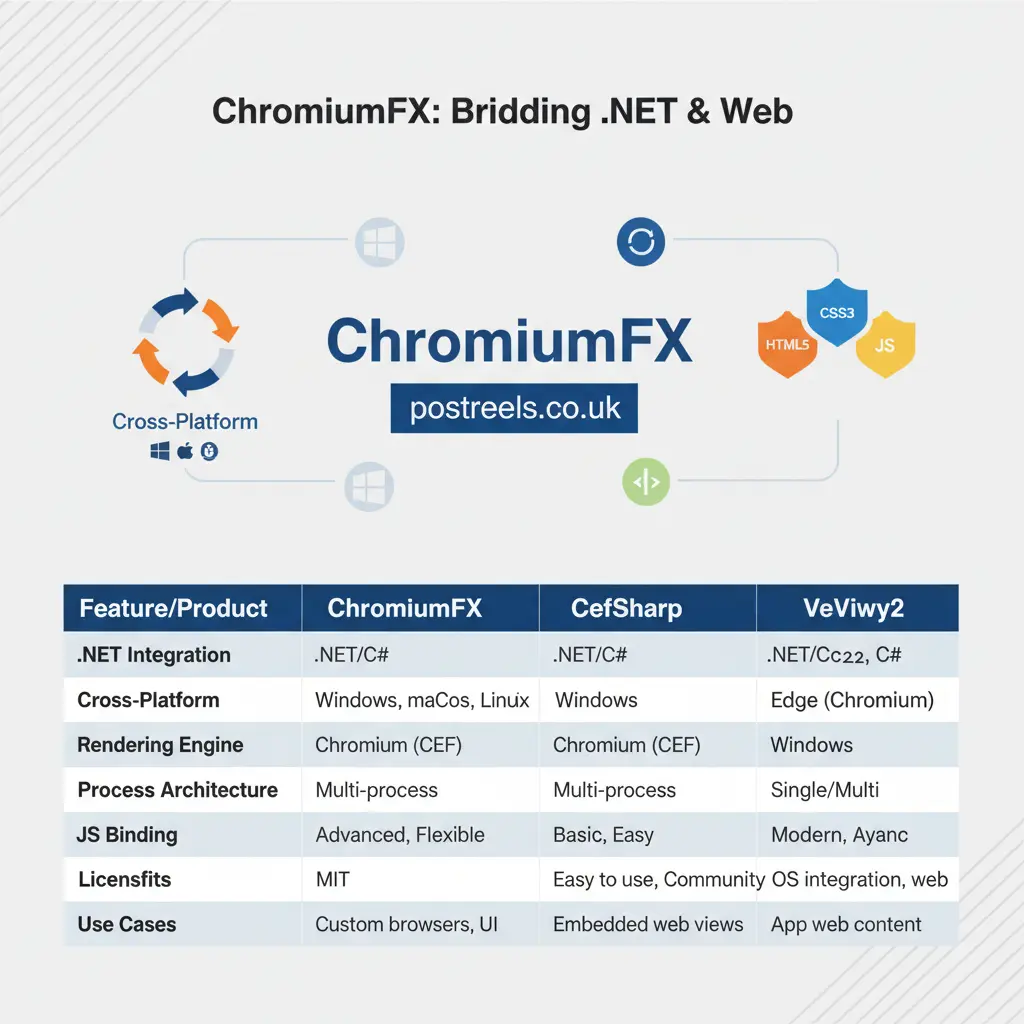
If you are shopping around for browser embedding tools, you need to know the competition. The two biggest rivals are CefSharp and Microsoft WebView2. CefSharp is very similar to it but generally has a larger community and more frequent updates. It is often the default choice for people who want a direct CEF wrapper.
Microsoft WebView2 is the modern heavyweight. Instead of bundling the browser engine inside your app (which makes your app file size huge), WebView2 uses the Edge browser already installed on the user’s Windows machine. This makes your app much smaller and ensures security patches are handled by Windows Update.
So, why stick with ChromiumFX? Sometimes you need the browser engine to be the same version on every single machine, regardless of what Windows updates the user has installed. It allows you to bundle a specific version of Chromium, guaranteeing 100% consistency across all deployments.
How Do You Install and Set Up ChromiumFX?
Getting started involves a few technical steps, but it is not rocket science. The most common way to add this framework to your project is through NuGet, a package manager for .NET. You will typically find packages named “Unofficial.Chromiumfx” or similar variations, as the official repository has been quiet.
Once you install the package, you need to ensure you have the correct CEF binary files. These are the actual “guts” of the browser. It is just the .NET wrapper; it needs the native C++ files to function. You usually have to download these separately and place them in your project’s output folder.
After the files are in place, you initialize the engine in your code. This usually happens in the startup routine of your app. You tell the framework where to find the CEF files, configure any settings (like disabling GPU acceleration if needed for compatibility), and then create a browser window instance to display your content.
What Are the Common Challenges Developers Face?
No technology is perfect, and it has its quirks. One of the most frequent complaints is the “dependency hell.” Because it relies on specific versions of the unmanaged CEF binaries, if you mix and match the wrong versions, your app will crash instantly on startup.
Another challenge is memory usage. Because each browser instance spawns multiple processes, an app using it can eat up a lot of RAM. If you are building a simple tool, this might be overkill. You need to be careful about disposing of browser instances correctly when they are no longer needed to prevent memory leaks.
Debugging can also be tricky. Since you are bridging two different worlds (.NET and Chromium), figuring out where an error is coming from takes patience. Is it a JavaScript error on the page? Is it a C# exception? Or is it a crash in the native C++ engine? You often need to use remote debugging tools (opening a dev tools window in a separate browser) to see what is happening inside your embedded pages.
Can You Use ChromiumFX for Cross-Platform Apps?
Technically, yes, but there is a catch. The “Chromium” part of the name implies cross-platform capability, as Chromium runs on Windows, Linux, and macOS. However, it has historically been very Windows-centric due to its reliance on .NET and Windows Forms or WPF.
With the rise of .NET Core and .NET 5/6+, cross-platform support has improved, but it is not “plug and play” like some other frameworks. Getting it to run smoothly on Linux requires careful handling of dependencies and understanding how Linux handles window management (like GTK).
If your primary goal is to build an app that runs everywhere with zero changes, you might find frameworks like Electron or Maui (with Blazor) to be easier paths. But if you have a heavy .NET backend and need to deploy primarily to Windows with some Linux support, it can be made to work with some elbow grease.
How Does ChromiumFX Handle Security?
Security is massive when you are essentially running a web browser inside your software. It inherits the robust security model of the Chromium project. This includes sandboxing, which isolates the rendering processes from the rest of the operating system.
However, the security of your app depends on how you configure it. If you disable the sandbox to make development easier (a common mistake), you open up vulnerabilities. If you allow your JavaScript code to execute arbitrary shell commands on the user’s machine without validation, you are asking for trouble.
You also need to be mindful of updates. Since it requires you to bundle the browser binaries, you are responsible for updating them. If a major security flaw is found in Chrome, your users are vulnerable until you release a new version of your app with the patched binaries.
What Are Some Real-World Use Cases?
You might be surprised where this technology shows up. A classic example is digital signage. Those screens you see in airports or fast-food restaurants often run a desktop application that uses it to render the flashy graphics and video content using web technologies.
Another use case is in enterprise automation tools. Imagine a company that has a legacy web portal that employees need to use. Developers can build a custom desktop wrapper using it that automatically logs the user in, navigates to specific pages, and scrapes data, all while providing a custom sidebar with extra tools.
It is also used in gaming launchers. Many game studios build their launchers (where you buy and download games) using web tech for the UI because it is easy to update the store layout without patching the whole executable. It provides the engine to render that store.
How Do You Communicate Between C# and JavaScript?
This is the “magic” feature. It allows you to register C# objects so they appear inside the JavaScript context of the browser. For example, you can create a C# function called SaveFileToDisk. You can then call the window.SaveFileToDisk() directly from your JavaScript code on the web page.
This bi-directional communication is what makes hybrid apps so powerful. You can build a beautiful, animated UI using a library like React or Vue.js, and when the user clicks a button, it triggers heavy-duty data processing in your efficient C# backend.
Passing data back and forth is usually done using JSON strings. You send a JSON object from C# to the browser, and the JavaScript parses it to update the chart or table. It is a clean, effective way to separate your view logic from your business logic.
Is ChromiumFX Performance Better than Electron?
This is a common debate. Electron is a very popular framework that also bundles Chromium and Node.js. In terms of raw rendering speed, they are very similar because they use the same engine. However, it can be more efficient for .NET developers.
Electron requires running a Node.js process alongside the browser. If your backend logic is already in .NET, using Electron adds an extra layer of overhead. It integrates directly into the .NET runtime. This means you don’t need the overhead of Node.js if you don’t want it.
For a team that is already proficient in C#, ChromiumFX (or similar .NET wrappers) will likely result in a more performant application because the team can optimize the backend code more effectively than they could with JavaScript in the Electron main process.
Tips for Optimizing ChromiumFX Apps
If you want your app to feel snappy, start by managing your resources. Don’t create a new browser instance for every little thing. Re-use browser windows where possible. Browser initialization is expensive and takes time.
Be careful with what you load. Just because you have a full browser doesn’t mean you should load heavy frameworks if you don’t need them. Keep your HTML and CSS lightweight. The faster the browser can parse the page, the faster your app feels.
Finally, handle the “white flash.” When a browser window first opens, it often flashes white before loading the content. This looks unprofessional. You can hide the browser control until the page has fully loaded, then make it visible. This creates a much smoother user experience.
The Future of Embedded Browsers
The tech world is moving toward “WebView2” and system-provided browsers to reduce disk space usage. However, the concept behind ChromiumFX—embedding a dedicated engine—will always have a place. There are scenarios where you cannot rely on the user having the right version of Edge installed.
We are also seeing a shift toward WebAssembly (Blazor). This allows .NET code to run directly inside the browser sandbox. While this is different from embedding a browser, it solves the same problem of using web UIs with .NET logic.
Despite these shifts, it remains a testament to the flexibility of the .NET ecosystem. It proves that you don’t have to choose between the web and the desktop; you can have the best of both.
Key Takeaways
- ChromiumFX is a .NET framework for embedding the Chromium browser engine into desktop apps.
- It offers deep integration, allowing C# and JavaScript to communicate bi-directionally.
- The architecture uses multiple processes to ensure application stability, similar to Google Chrome.
- It is a strong choice for enterprise tools requiring specific browser versions, though maintenance has slowed.
- Major alternatives include CefSharp (active community) and Microsoft WebView2 (system-shared engine).
- Security is robust but requires the developer to manually manage updates for the bundled binaries.
- It is best suited for Windows-centric development teams who need full control over the browsing environment.
FAQs
1. Is ChromiumFX free to use?
Yes, it is an open-source project. You can use it in both personal and commercial applications without paying licensing fees, though you must adhere to the BSD-style license terms.
2. Can I use Chrome extensions with ChromiumFX?
It is difficult. While the underlying CEF engine has some support for extensions, it does not provide an easy “one-click” way to install Chrome extensions like an ad blocker or password manager. It is primarily designed for displaying app content, not for general web browsing.
3. Does ChromiumFX support video playback?
Yes, it supports standard HTML5 video. However, proprietary codecs (like H.264 used in some MP4s) might not work out of the box because the open-source Chromium build does not include licenses for them. You may need to build your own version of CEF with proprietary codecs enabled if you have the license to do so.
4. Why is my ChromiumFX app file size so large?
This is normal. You are bundling a nearly complete web browser with your application. The CEF binaries alone can be over 100MB. If file size is a major concern, consider using Microsoft WebView2 instead.
5. Is ChromiumFX better than the standard .NET WebBrowser control?
Absolutely. The old WebBrowser control in Windows Forms uses Internet Explorer technology, which is obsolete and insecure. ChromiumFX uses the modern rendering engine found in Chrome, making it infinitely better for modern web standards.
6. Can I use ChromiumFX with .NET Core or .NET 6+?
Yes, modern forks and unofficial packages of ChromiumFX have been updated to support .NET Core and newer versions of the .NET Framework, although setup might require specific configuration compared to the older .NET Framework 4.x.
Conclusion
Navigating the world of desktop development can feel like walking through a maze. ChromiumFX offers a powerful path for those who want to combine the visual flair of the web with the stability of the desktop. While it may not be the newest kid on the block, its ability to provide a consistent, controllable environment makes it a tool worth understanding.
Whether you decide to use it for a legacy rewrite or a specialized internal tool, knowing how ChromiumFX functions gives you a significant edge. It reminds us that in software development, having the right tool for the specific job is always more important than just following the latest trend. As you plan your next project, weigh the need for control against the convenience of newer alternatives, and you will make the right choice.