

The rising reports of rtx 5090 5090d bricked issues have quickly become a major concern among PC enthusiasts, gamers, and system builders who invest in next-generation graphics hardware. A “bricked” GPU typically means the card is no longer detected, fails to display output, or becomes unusable after a failed update, power instability, or firmware error.
Many users suspect causes like VBIOS firmware corruption, unstable PCIe Gen5 compatibility, improper 12VHPWR power connector seating, or faulty driver updates that interrupt critical processes. In real-world builds, especially high-performance rigs in the U.S., even small setup mistakes such as outdated motherboard BIOS or low-quality PSU units can trigger serious failures.
Understanding the technical reasons behind these failures is essential before attempting fixes. By learning how GPU not detected in BIOS scenarios occur, and how to diagnose soft versus hard brick symptoms, users can protect their expensive RTX 5090 or 5090D from permanent damage.
What does “Bricked” Mean in rtx 5090 5090d bricked issues?
When people talk about rtx 5090 5090d bricked issues, they usually mean one of two things:
- Soft brick
- Hard brick
A soft brick happens when the GPU firmware or driver crashes. The card may still power on. Fans spin. RGB lights work. But Windows does not detect the GPU. Or the display driver fails repeatedly.
A hard brick is worse. The system will not POST. The motherboard does not detect the GPU in BIOS. Device Manager shows nothing. Even after reseating, clearing CMOS, or swapping PCIe slots, the card appears dead.
On high-end GPUs like the NVIDIA GeForce RTX 5090 and RTX 5090D, firmware corruption during a VBIOS update can permanently damage the EEPROM chip. That is when users often need RMA or SPI flash recovery.
Understanding the difference is critical before trying any fix.
Why Are rtx 5090 5090d bricked issues happening?
There is no single cause. Instead, several risk factors overlap.
Here are the most common technical triggers:
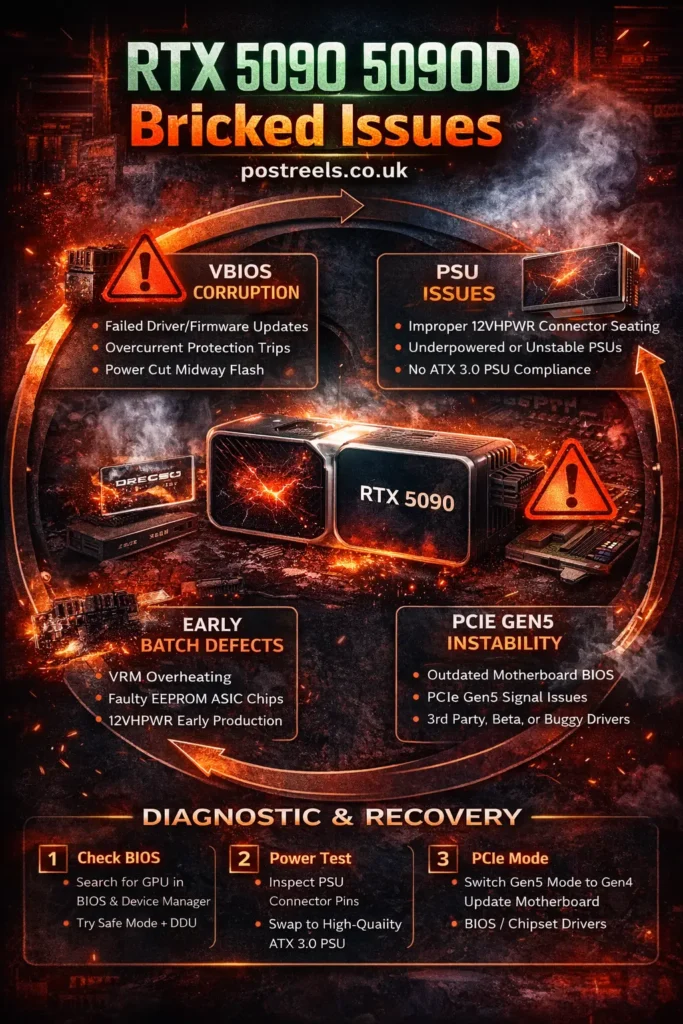
1. VBIOS Firmware Corruption
Firmware corruption can happen during:
- Driver updates
- VBIOS flashing
- Power interruption mid-update
- Forced restarts during installation
If overcurrent protection trips during a firmware flash, the GPU may never boot again.
2. PCIe Gen5 Compatibility Problems
The RTX 5090 uses PCI Express Gen5. Some early motherboard BIOS versions struggled with Gen5 signal stability.
In several U.S. PC builder forums, users with older Z790 and X670 boards reported black screens until switching PCIe to Gen4 mode in BIOS.
3. Secure Boot and UEFI Handshake Conflicts
Secure Boot can sometimes block firmware communication during driver installation. This is rare but reported.
Disabling Secure Boot before installing major GPU updates has helped some users avoid issues.
4. Power Delivery and 12VHPWR Cable Issues
The 12VHPWR connector demands precise seating.
Common mistakes:
- Using split adapters instead of native ATX 3.0 PSU cables
- Loose cable insertion
- Sharp cable bends
If the GPU experiences unstable power during firmware activity, the corruption risk increases.
Are rtx 5090 5090d bricked issues related to the 5090D Variant?
Yes, in some cases.
The RTX 5090D, designed for specific export markets, may have firmware differences. Some board partners implemented dual-BIOS switches.
Users reported problems when:
- Toggling the BIOS switch while the system is powered on
- Flashing firmware meant for standard RTX 5090
- Mixing incompatible VBIOS versions
If you own a 5090D, never flash firmware designed for a non-D model.
What Are the Warning Signs Before a GPU Gets Bricked?
Sometimes there are clues before full failure.
Watch for:
- Random driver crashes under load
- GPU disappearing from Device Manager
- System freezing during driver installation
- Fans spinning at 100% after reboot
- Black screen after BIOS splash
In Texas, one PC repair shop shared a case where a customer ignored repeated driver crash warnings. A forced shutdown during the update led to a hard brick.
If you see early signs, stop updating immediately.
How Can You Diagnose rtx 5090 5090d Bricked Issues Step by Step?
Here is a practical diagnostic workflow used by system builders:
Step 1: Check for Soft Brick
- Boot into Safe Mode
- Use DDU (Display Driver Uninstaller)
- Reinstall the stable NVIDIA driver
- Check Device Manager
If the GPU reappears, it was likely driver corruption.
Step 2: Test Hardware Detection
- Enter the motherboard BIOS
- Look for the PCIe device listing
- Switch PCIe Gen5 to Gen4
- Clear CMOS
If still not detected, continue.
Step 3: Power System Isolation
- Swap the PSU with a certified ATX 3.0 unit
- Use a native 12VHPWR cable
- Remove cable extensions
Power instability is more common than many assume.
Step 4: Advanced Recovery
If the BIOS cannot detect the GPU:
- Attempt dual-BIOS switch (if available)
- Consider SPI programmer reflash (advanced users only)
- Contact the manufacturer for RMA
Never attempt random firmware files from unknown sources.
Can You Fix rtx 5090 5090d bricked issues without RMA?
Sometimes yes. Sometimes no.
Here is a quick comparison:
| Scenario | Likely Type | Fix Possible? | Recommended Action |
|---|---|---|---|
| Driver crash only | Soft brick | Yes | DDU + reinstall |
| GPU visible in BIOS but not Windows | Soft brick | Yes | Clean driver install |
| No BIOS detection | Hard brick | Rare | Dual BIOS or RMA |
| Burnt 12VHPWR pins | Hardware damage | No | Replace card |
If the EEPROM chip is corrupted, home recovery is difficult. Only advanced users with SPI flash tools should attempt firmware restoration.
Most U.S. users resolve via warranty replacement.
Are PSU and ATX 3.0 Requirements Critical for RTX 5090 Stability?
Absolutely.
The RTX 5090 draws massive power spikes. Even high-wattage older PSUs may fail under transient loads.
Minimum recommendations:
- 1000W high-quality PSU
- ATX 3.0 compliant
- Native 12VHPWR cable
- No third-party cable extensions
A California-based custom PC builder reported zero bricking cases after switching exclusively to native ATX 3.0 supplies.
Power integrity matters more than wattage alone.
How does PCIe Gen5 Impact rtx 5090 5090d bricked issues?
PCIe Gen5 doubles bandwidth. But it also increases signal sensitivity.
Early BIOS versions from some motherboard manufacturers showed instability under heavy load.
Workaround many users applied:
- Manually set PCIe slot to Gen4
- Update the motherboard BIOS to the latest version
- Update chipset drivers
In most cases, switching to Gen4 had no real-world performance impact but improved stability.
What is the Difference Between Driver Crash and a true GPU Brick?
This confusion causes panic.
Driver crash:
- Windows loads
- GPU appears in Device Manager
- Reinstall fixes the problem
True brick:
- No POST
- No BIOS detection
- No display output at all
A bricked GPU behaves as if it is physically disconnected.
Understanding this difference prevents unnecessary RMA claims.
What Prevention Checklist Should You Follow?
Here is a simple prevention list to avoid rtx 5090 5090d bricked issues:
- Update the motherboard BIOS before installing the GPU
- Use an ATX 3.0 PSU with a native cable
- Avoid beta GPU drivers
- Disable Secure Boot during major driver updates
- Never interrupt firmware flashing
- Do not toggle the dual BIOS switch while powered
- Ensure proper airflow and VRM cooling
Small precautions reduce big risks.
Are Early Production Batches More at Risk?
Early hardware batches sometimes expose design flaws.
In past GPU launches, initial firmware builds required patches.
If you bought your RTX 5090 during early release:
- Check for official firmware advisories
- Confirm the latest stable VBIOS version
- Avoid unofficial modded BIOS files
Hardware defects are rare. But early firmware instability is more common.
What Should U.S. Buyers Know About Warranty and RMA?
Most major board partners in the United States offer multi-year warranty coverage.
Before RMA:
- Document troubleshooting steps
- Record POST behavior
- Take photos of connectors
- Keep original packaging
Do not open the card. That may void the warranty.
Manufacturers can detect unauthorized firmware changes.
What Are the Signs of a Bricked GPU vs Display Driver Crash?
One of the most overlooked aspects of rtx 5090 5090d bricked issues is understanding the difference between a true hardware brick and a simple driver failure. Many users panic when they see a black screen, but not every crash means permanent damage.
Common signs of a bricked GPU vs display driver crash include:
- No display output even before the BIOS screen
- GPU not detected in BIOS or Device Manager
- Fans spinning but no POST signal
- Persistent hardware error after multiple reboots
In contrast, a driver crash usually allows the system to boot into Windows, where reinstalling drivers can restore functionality. This is why “Driver rollback and DDU safe mode” troubleshooting is often the first recovery step recommended by technicians. If DDU in Safe Mode restores detection, the issue is likely software-related rather than true VBIOS firmware corruption.
How does VBIOS Firmware Corruption Cause rtx 5090 5090d bricked issues?
VBIOS firmware corruption is one of the most technically accurate explanations behind modern high-end GPU failures. During a firmware update or driver installation, the GPU writes essential instructions to its onboard memory chip.
If the process is interrupted due to:
- Power instability
- Forced shutdown
- Overcurrent protection tripping during flash
- Unstable firmware update
The GPU may fail to initialize at boot. Advanced users in custom U.S. PC builds have reported cases where a sudden power fluctuation during a firmware update permanently disabled their NVIDIA RTX 5090.
Unlike software issues, corrupted VBIOS often requires SPI flashing tools or manufacturer-level repair, making prevention far more important than recovery.
Can PCIe Gen5 Compatibility with RTX 5090 Trigger Bricking Problems?
Yes, PCIe Gen5 compatibility with RTX 5090 has been a recurring discussion in enthusiast forums and repair communities. Newer GPUs rely on PCI Express Gen5 bandwidth, but not all motherboards handle Gen5 signaling equally well.
A PCIe Gen5 RTX 5090 compatibility issue may appear as:
- GPU not detected in BIOS
- Random system freezes during load
- Black screen after driver install
Many system integrators recommend switching PCIe mode to Gen4 in BIOS as a diagnostic step. In real-world builds using ASUS, Gigabyte, and MSI motherboards, this simple adjustment has restored GPU stability without affecting performance in most gaming workloads.
Are Secure Boot and UEFI Handshake GPU Issues a Hidden Risk?
Secure Boot and UEFI handshake GPU issues are rarely discussed but can play a role in rtx 5090 5090d bricked issues during major driver installations. When UEFI Secure Boot policies conflict with unsigned firmware components, the GPU may fail to initialize properly after reboot.
This is especially relevant when:
- Installing fresh firmware update packages
- Updating BIOS and GPU drivers simultaneously
- Using experimental drivers
Some advanced builders temporarily disable UEFI Secure Boot before major firmware updates to ensure uninterrupted GPU communication during installation.
What Are RTX 5090D Dual BIOS Switch Precautions You Must Follow?
The NVIDIA RTX 5090D often includes a dual-BIOS feature designed for redundancy and performance tuning. However, incorrect usage can lead to serious problems.
Critical RTX 5090D dual BIOS switch precautions include:
• Never toggle the BIOS switch while the PC is powered on
• Avoid flashing firmware meant for standard RTX 5090 models
• Always verify BIOS version compatibility before updates
There have been documented cases where users accidentally switched BIOS modes mid-boot, resulting in firmware mismatch and permanent boot failure.
Could Early Production Batch Hardware Defects Be Responsible?
Early production batch hardware defects are another factor often ignored in mainstream articles. New GPU launches sometimes ship with early firmware revisions that are later patched through updates.
Potential defect-related triggers include:
- Faulty EEPROM chips
- VRM thermal instability
- Memory controller inconsistencies
Custom PC repair shops in the U.S. have reported higher RMA rates during early launch cycles compared to later stabilized batches, especially for flagship GPUs with extreme power draw.
Why Is the 12VHPWR Standard and PSU Wattage ATX 3.0 So Important?
The 12VHPWR standard demands stable and clean power delivery, especially for GPUs like the NVIDIA RTX 5090 and NVIDIA RTX 5090D. Using older PSUs without ATX 3.0 certification increases the risk of voltage spikes during high load or firmware activity.
Safe PSU for RTX 5090 power delivery should include:
- ATX 3.0 compliance
- Native 12VHPWR cable (no adapters)
- 1000W–1200W high-quality PSU
- Stable transient response
Insufficient power delivery can trigger shutdown protection, which may interrupt a firmware update and cause permanent bricking.
What Should You Do If the RTX 5090 Driver Update Bricks After Flash Happens?
If an RTX 5090 driver update is bricking after flash occurs, immediate action can sometimes prevent permanent damage.
Recommended recovery workflow:
- Boot into Safe Mode
- Perform Driver rollback and DDU safe mode cleanup
- Reinstall stable drivers only
- Check BIOS GPU detection
- Avoid repeated forced restarts
This structured method helps distinguish software corruption from true hardware failure.
How Can You Fix GPU VBIOS Corruption Signs and Fix Issues Safely?
GPU VBIOS corruption signs and fix procedures require technical caution. If the GPU still appears in BIOS but fails in Windows, recovery may be possible.
Advanced solutions include:
- Official firmware reflash tools
- Secondary GPU for blind flash recovery
- Professional SPI programmer repair
However, if the motherboard and GPU (from ASUS, Gigabyte, or MSI) show zero detection, RMA is usually the safest path rather than risky manual flashing.
Why Is My RTX 5090 Not Detected in BIOS After Installation?
One of the most-searched long-tail queries tied to RTX 5090 5090D bricked issues is: “Why is my RTX 5090 not detected in BIOS?”
Common root causes include:
- PCI Express Gen5 slot instability
- Outdated motherboard BIOS
- Improper 12VHPWR cable seating
- Firmware update interruption
- PSU wattage recommendations ATX 3.0 not met
In many real-world cases, updating the motherboard BIOS and reseating the GPU with a native power cable restored full detection without requiring replacement.
Key Takeaways About rtx 5090 5090d bricked issues
- Most cases are driver-related soft bricks
- True hard bricks often involve firmware corruption
- ATX 3.0 PSU and proper 12VHPWR seating are critical
- PCIe Gen5 instability can be mitigated by switching to Gen4
- Dual BIOS misuse can cause issues on 5090D
- RMA is the safest solution for a confirmed hard brick
Final Thoughts on rtx 5090 5090d bricked issues: Should You Be Worried?
High-end GPUs push limits. The RTX 5090 and RTX 5090D are powerful devices. But power demands precision.
The majority of rtx 5090 5090d bricked issues come down to:
- Firmware interruption
- Power instability
- BIOS incompatibility
With proper installation, updated motherboard firmware, stable drivers, and a certified ATX 3.0 PSU, the risk drops significantly.
If your GPU is already unresponsive, follow the diagnostic steps calmly. Avoid panic flashing. And contact the manufacturer if needed.
A systematic approach saves money and stress.
FAQs About rtx 5090 5090d Bricked Issues
What are rtx 5090 5090d bricked issues?
They refer to situations where the GPU becomes unresponsive, is not detected in BIOS, or fails to display output due to firmware, power, or hardware-related failures.
Can a driver update brick an RTX 5090?
Yes, a failed or interrupted driver or firmware update can cause VBIOS firmware corruption and lead to a soft or hard brick.
How do I know if my GPU is bricked or just a driver crash?
If the GPU is not detected in BIOS and shows no display output at POST, it is likely bricked; driver crashes usually still allow system boot.
Why is my RTX 5090 not detected in BIOS?
This can happen بسبب PCIe slot issues, outdated motherboard BIOS, loose 12VHPWR cable, or firmware corruption.
Can PCIe Gen5 compatibility cause RTX 5090 problems?
Yes, PCIe Gen5 compatibility with RTX 5090 may cause instability on some motherboards, and switching to Gen4 can sometimes resolve detection issues.