

What Is SFM Compile and Why Does It Matter?
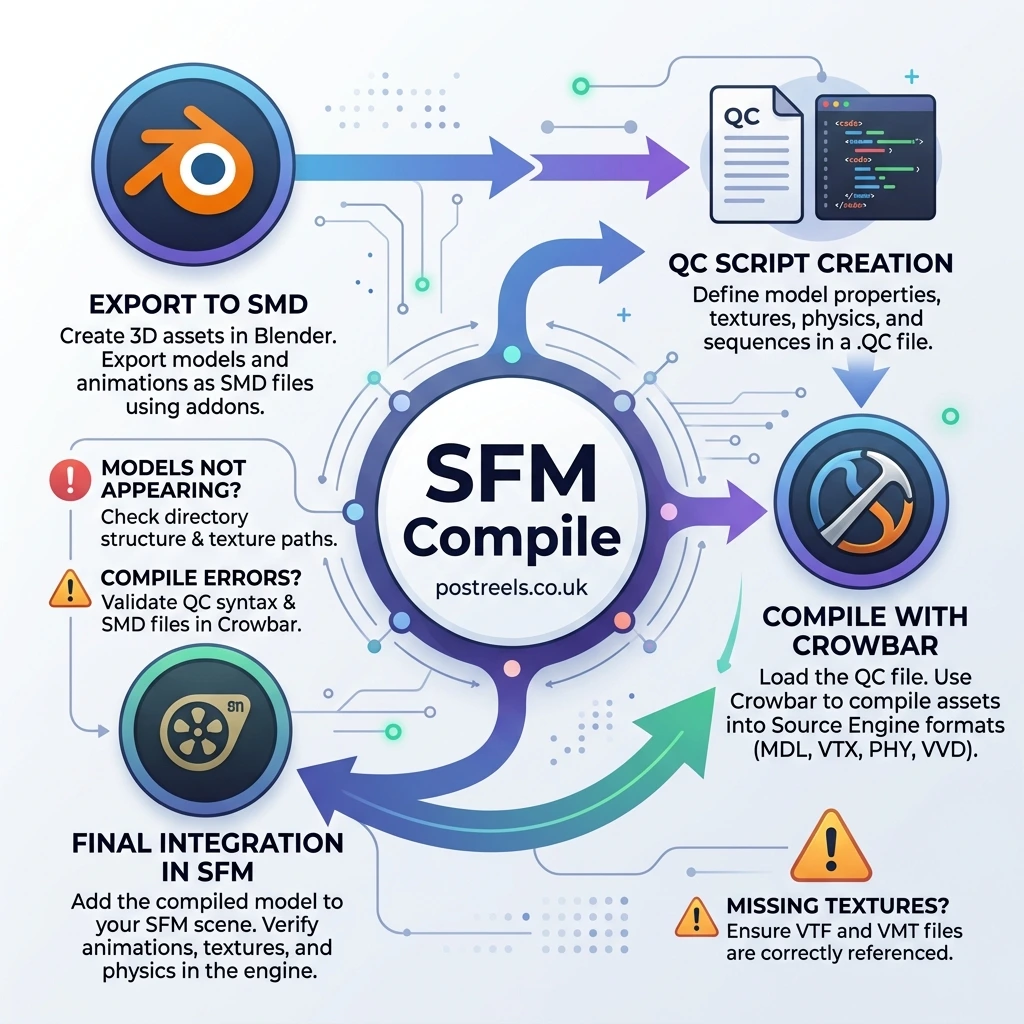
SFM compile is the process of converting raw 3D files into Source Engine-compatible formats for use inside Source Filmmaker. Without this process, Source Filmmaker cannot properly load custom models, textures, animations, or maps.
The workflow usually starts in Blender, Maya, or 3ds Max. Artists export files like.SMD or.DMX, create a QC script, then compile everything into .MDL, .VVD, .VTX, and .PHY files using tools like Crowbar or studiomdl.exe.
In simple terms, the SFM compile acts like a translator between modern 3D software and Valve’s older Source Engine pipeline.
This workflow is still heavily used by creators making:
- Team Fortress 2 machinima
- Garry’s Mod animations
- Half-Life 2 cinematics
- Steam Workshop assets
- Custom SFM character rigs
- Meme videos and YouTube shorts
Many beginners confuse SFM compile with rendering videos. In reality, there are two meanings:
| Type | Meaning |
| Model Compilation | Converting 3D assets into Source-compatible files |
| Video Compilation | Exporting rendered SFM animations as AVI or image sequences |
Both meanings rank on Google for the keyword “sfm compile,” so understanding both workflows helps creators avoid confusion.
What Tools Do You Need for SFM Compile?
A complete Source Filmmaker compile workflow depends on several tools working together.
Core SFM Compile Tools
| Tool | Purpose |
| Crowbar | GUI compiler/decompiler for SFM models |
| studiomdl.exe | Valve’s command-line compiler |
| Blender | Creating and editing models |
| Blender Source Tools | Exporting SMD/DMX files |
| VTFEdit | Converting textures into VTF format |
| HLMV | Previewing compiled models |
| Notepad++ | Editing QC scripts |
| Source SDK | Source Engine utilities |
For most beginners, Crowbar is the easiest starting point because it provides compile logs, file browsing, and error reporting in one interface.
How Does the SFM Compile Pipeline Actually Work?
Many tutorials skip the full workflow. That is why beginners struggle when models fail after export.
Here is the complete end-to-end SFM compile pipeline:
| Step | Action |
| 1 | Create or import a model in Blender |
| 2 | Rig the model with a bone hierarchy |
| 3 | Export as SMD or DMX |
| 4 | Convert textures into VTF/VMT |
| 5 | Write a QC script |
| 6 | Compile using Crowbar or studiomdl |
| 7 | Generate MDL/VVD/VTX/PHY files |
| 8 | Test inside HLMV |
| 9 | Import into Source Filmmaker |
| 10 | Render or animate |
One common mistake is skipping HLMV testing. Experienced SFM creators almost always preview models there first because it catches:
- missing textures
- broken animations
- incorrect collision models
- scaling issues
- invisible meshes
How Do You Write a QC File for SFM Compile?
The QC file is the heart of the entire compile process.
It tells studiomdl.exe:
- where your model is located
- which textures to use
- which animations to include
- Where compiled files should go
Basic QC Script Example
$modelname “custom/mycharacter.mdl”
$body studio “mycharacter_reference.smd”
$cdmaterials “models/custom”
$sequence idle “mycharacter_idle.smd” fps 30
$collisionmodel “mycharacter_phys.smd”
{
$mass 80
}
Important QC Commands
| QC Command | Purpose |
| $modelname | Output model path |
| $body | Main mesh file |
| $cdmaterials | Material folder |
| $sequence | Animation sequence |
| $collisionmodel | Physics mesh |
| $surfaceprop | Material physics behavior |
A small typo in a QC file can break the entire compile process. That is why many creators keep backup templates for future projects.
How Do You Compile Models with Crowbar?
Crowbar is the preferred tool for most modern SFM users because it removes the complexity of command-line compiling.
Crowbar Workflow
Step 1 — Open Crowbar
Launch Crowbar and select the “Compile” tab.
Step 2 — Load the QC File
Browse to your .QC script.
Step 3 — Set Game Directory
Point Crowbar to:
Steam\steamapps\common\SourceFilmmaker\game\tf_movies
Step 4 — Start Compile
Click “Compile.”
Crowbar will:
- call studiomdl.exe
- process your SMD files
- generate MDL output files
- display compile logs
Step 5 — Check the Logs
If something fails, Crowbar usually highlights:
- missing texture paths
- syntax errors
- unsupported bones
- broken sequences
This beginner-friendly workflow is why Reddit and Discord communities recommend Crowbar over raw CLI compiling.
How Does studiomdl.exe Work for Advanced SFM Compile?
Advanced users often prefer studiomdl.exe directly because it allows:
- batch compiling
- automation scripts
- faster iteration
- advanced debugging
Example Compile Command
studiomdl.exe -game “C:\SourceFilmmaker\game\tf_movies” mymodel.qc
This method is popular in professional Source Engine modding workflows.
Some creators even automate large projects using Python scripts and batch files.
How Do You Compile Textures with VTFEdit?
Textures are one of the biggest failure points in SFM compile workflows.
Source Filmmaker does not use standard PNG or JPG textures directly.
Instead, textures must become:
- .VTF files
- .VMT material scripts
Texture Workflow
Step 1 — Open VTFEdit
Import your PNG or TGA texture.
Step 2 — Export as VTF
Save the texture inside:
materials/models/custom
Step 3 — Create a VMT File
Example:
“VertexLitGeneric”
{
“$basetexture” “models/custom/mytexture”
}
Why Do Pink Checkerboard Textures Appear?
Pink and black checkerboards almost always mean:
- broken material paths
- missing VTF files
- incorrect VMT references
This is probably the most common SFM compile problem on Reddit and Steam forums.
How Do You Export Blender Models to SFM?
Blender remains the most popular SFM pipeline tool because it is free and highly compatible with Blender Source Tools.
Recommended Blender Workflow
Install Blender Source Tools
This add-on enables:
- SMD export
- DMX export
- ValveBiped support
Prepare the Model
Keep:
- clean topology
- proper UV maps
- organized armatures
- low polygon counts
Export as SMD
Most beginners start with SMD because it is simpler than DMX.
Create QC + Compile
Use Crowbar to convert exported files into MDL format.
Real-World Example
A creator porting a Fortnite character into SFM usually follows:
- FBX import into Blender
- Weight paint fixes
- ValveBiped rig adjustments
- SMD export
- QC creation
- Crowbar compile
- HLMV testing
- Final SFM import
This workflow is standard across many U.S.-based SFM communities.
What Are the Most Common SFM Compile Errors?
Troubleshooting content performs extremely well because users constantly run into compile failures.
SFM Compile Error Fix Table
| Error | Cause | Fix |
| Pink textures | Missing VTF/VMT | Check material paths |
| Invisible model | Broken QC or rig | Re-export SMD |
| Compile window closes instantly | Syntax error | Check Crowbar logs |
| Missing animations | Incorrect $sequence | Fix sequence paths |
| Crash during compile | Corrupted SMD | Re-export from Blender |
| Broken physics | Invalid PHY mesh | Simplify collision model |
| Model too large | Scale mismatch | Apply transforms in Blender |
| Texture not loading | Wrong folder structure | Use tf_movies paths |
Experienced creators always read compile logs carefully before re-exporting files.
Can You Use SFM Compile on Mac or Linux?
This is one of the biggest unanswered questions online.
Technically, studiomdl.exe is Windows-only. However, many creators successfully compile on Linux and macOS using:
- Wine
- Proton
- CrossOver
- Virtual Machines
Linux Workaround Example
Some users run:
wine studiomdl.exe
inside a Source SDK environment.
Performance varies depending on the setup, but it works surprisingly well for smaller projects.
Very few tutorials explain this properly, which creates a strong SEO opportunity for advanced guides.
What Is Better: Crowbar or studiomdl.exe?
Crowbar vs studiomdl Comparison
| Feature | Crowbar | studiomdl.exe |
| Beginner friendly | Yes | No |
| GUI interface | Yes | No |
| Batch processing | Limited | Excellent |
| Advanced scripting | Moderate | Excellent |
| Error visibility | Easy | Technical |
| Speed | Good | Faster |
Which Should You Use?
Use Crowbar If:
- you are new to SFM
- you want visual logs
- you prefer GUI workflows
Use studiomdl.exe If:
- you automate projects
- you batch compile assets
- you need advanced debugging
Most creators eventually learn both.
How Can You Optimize SFM Compile Performance?
Large models can slow compile times dramatically.
Best Practices
Keep Polygon Counts Reasonable
Many creators stay under:
- 60,000 triangles for characters
- lower for props
Use LODs
Level of Detail models reduce rendering load.
Compress Large Textures
Huge 4K textures can increase memory usage and crashes.
Store Projects on SSDs
SSD compile times are noticeably faster than HDDs.
Test Incrementally
Compile small changes often instead of rebuilding entire projects.
This approach saves hours during large machinima productions.
How Do You Export and Render SFM Videos?
The second meaning of “sfm compile” relates to exporting finished animations.
Export Options
| Format | Best Use |
| AVI | Fast previews |
| PNG Sequence | High-quality renders |
| TGA Sequence | Professional compositing |
Most experienced SFM animators prefer image sequences because:
- crashes do not ruin the full render
- frames can be re-rendered individually
- quality stays consistent
Recommended Render Settings
- 1080p resolution
- 30 FPS or 60 FPS
- Ambient Occlusion enabled
- Motion blur for cinematic scenes
YouTube creators in the U.S. commonly use Adobe Premiere Pro or DaVinci Resolve after export.
Key Takeaways
- SFM compile is the process of converting raw 3D assets into Source Engine-compatible files for Source Filmmaker.
- The most important tools are Crowbar, studiomdl.exe, Blender Source Tools, and VTFEdit.
- QC scripts control how models, animations, textures, and physics behave after compilation.
- Pink checkerboard textures usually mean broken material paths or missing VTF/VMT files.
- Crowbar is easier for beginners, while studiomdl.exe gives more advanced control.
- Testing models in HLMV before importing them into SFM saves hours of troubleshooting.
- Most SFM compile errors come from bad file paths, incorrect QC syntax, or export settings.
Conclusion
SFM compile is much more than pressing a compile button. It is the entire workflow that transforms raw 3D assets into Source Engine-ready models, textures, animations, and rendered videos.
The most successful Source Filmmaker creators learn:
- QC scripting
- Crowbar workflows
- texture compilation
- Blender exports
- troubleshooting methods
- optimization techniques
Beginners often struggle with pink textures, broken rigs, and compile errors at first. That is completely normal.
The key is to build a clean workflow:
Blender → SMD → QC → Crowbar → HLMV → SFM.
Once you understand that pipeline, compiling custom Source Filmmaker assets becomes dramatically easier.
FAQs About SFM Compile
What is SFM compile?
SFM compile is the process of converting raw 3D assets into Source Engine-compatible formats for Source Filmmaker.
What is a QC file in SFM?
A QC file is a script that tells studiomdl.exe how to compile models, animations, textures, and physics.
Why are my SFM textures pink?
Pink checkerboard textures usually mean the VTF or VMT material paths are incorrect or missing.
Is Crowbar required for SFM compile?
No. Crowbar is optional, but it simplifies the process significantly for beginners.
What file formats does Source Filmmaker use?
Common formats include:
- SMD
- DMX
- QC
- MDL
- VTF
- VMT
- VVD
- VTX
- PHY
Can Blender export directly to SFM?
Not directly. Blender exports SMD or DMX files that must still be compiled into MDL format.
Does SFM compile support Source 2?
No. Traditional SFM compile workflows target Source 1 assets, not Source 2.